We have seen string data type, but in this lesson, let’s learn about how to manipulate string using various available methods and also learn about substring extraction using string slicing.
Overview
When working with textual data, we will be performing various common operations like making text uppercase or lowercase, checking if a substring exists in full text, extracting part of the string, etc. Most of these operations are built-in the str data type.
Creating strings
We have seen that we can create string using either single quote or double quote. We can also use triple quotes like below.
1str1 = 'Hello'
2str2 = "Hi"
3str3 = '''Hello there'''
4str4 = """Hi there"""
We can also create multiline string using triple quotes
1multiline_str = """This line is spanning
2multiple lines"""
3print(multiline_str)
Output:
This line is spanning
multiple lines
We can join two strings using + operator. This is called string concatenation.
1"Hello " + "John"
If we multiply a number to string, it will repeat the same string that many times.
1"Hello " * 3
gives us “Hello” string repeated three times like Hello Hello Hello .
String Indexing
Strings are actually character sequences. So, if we want to lookup a character at a specific index position, we can extract them using String indexing operation. In Python and in most programming languages, index starts from 0.
Let’s see few examples.
1str = "hello"
2str[1] # 'e'
3str[2] # 'l'
4str[4] # 'o'
We can also negatively index string from the end of the string.
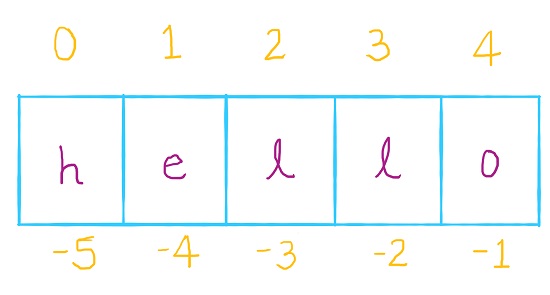
In above image, the last character in word Hello can be referenced using index position 4 or -1
1str = 'Hello'
2print(str[4]) # 'o'
3print(str[-1]) # 'o'
Strings are immutable which means they cannot be modified. If we try to modify string characters using string indexing, we get an error.
1str = 'Hello'
2str[3] = 'o'
Output:
TypeError: 'str' object does not support item assignment
Similarly, if we try to get a character from the index position that doesn’t exist for a string, we get IndexError.
1str = 'Hello'
2print(str[5])
This produces index out of range error.
Output:
IndexError: string index out of range
To avoid such issues we can find the length of the string using len function and use that function so that we can never go beyond the length of the string.
1str = 'howdy!'
2str_length = len(str) # 6
3print(str_length)
4print(str[str_length - 1])
Output:
6
!
String Slicing
To extract substring out of original string, we use string slicing. This relies on string indices and to extract substring, we have specify starting index position and end index position. The basic structure looks like this.
1str[start:stop]
Pleaes note that the start index element is included but stop index is not included in the returned substring.
1str = 'hello there'
2str[2:4] # ll
3str[0:5] # hello
4str[6:11] # there
5str[6:len(str) - 1] # there
The interesting part about string slicing is that we can have stop value beyond the string length and it will still return string upto end of the string without throwing an error. For example, str[6:15] will still return substring there.
We can also avoid specifying start and stop positions in string slicing. If we don’t specify anything for start index, it will default to index position 0. Similarly, if we don’t specify anything for stop position, it will default to end of the string.
1str = 'hello there'
2print(str[0:]) # default stop at end of string
3print(str[6:])
4print(str[:5]) # default start at 0
Output:
hello there
there
hello
With String slicing, we can also specify third value step. This value will jump that many index positions. With this string slicing looks like str[start:stop:step]
1str = 'hello'
2str[0:5:2] # 'hlo'
Here, we specified step value of 2. Hence, it will return characters at index positions 0, 2 and 4.
1numeric = '12345678'
2numeric[0::2] # 1357
3numeric[0::3] # 147
String Functions and Methods
String object has a function called len which gives the length of the string. That is the number of characters for a given string. Let’s see these examples in console.
1name1 = 'Joseph'
2name2 = 'Jenny'
3name3 = 'Zara'
4print(len(name1))
5print(len(name2))
6print(len(name3))
Output:
6
5
4
For string formatting, we have seen format method. Methods we can think of them like functions. They work on specific type of object and are invoked using dot notation. The syntax for them looks like
1object_name.method_name()
Example:
1# format method using argument indexing
2print("Hello, {0}!".format("John"))
3# format method using keyword arugments
4print("Hello, {name}!".format(name="John"))
Output:
Hello, John!
Hello, John!
Let’s see some of the methods on string objects using Python REPL. I have also listed their functionality in the table below.
| Function | Description |
|---|---|
| lower | Convert string to lowercase |
| upper | Convert string to uppercase |
| title | Convert string to titlecase. Every word will have first character uppercase. |
| capitalize | First character will be uppercase. |
| swapcase | Change the case of each character in a string |
| startswith | Check whether a string starts with a given substring |
| endswith | Check whether a string ends with a given substring |
| count | Count the occurrences of a substring in a given string |
| isalpha | Check whether the string is only alphabetic. |
| isalnum | Check whether the string is alphanumeric. |
| isdigit | Check whether the string is made of digits only |
| isdecimal | Check if a string is decimal numbers. |
| split | This splits the string at space by default, but we can specify the string or character to split at. This returns a list. |
| join | Join list by a given string |
| removesuffix | Remove a substring from the end of the string if it exists. |
| removeprefix | Remove substring from the beginning of the string if it exists. |
| replace | Replace a substring with another substring |
| strip | Remove white space from both sides of the string. Similarly there is rstrip and lstrip to remove white space from only right or left sides respectively. |
| index | Find the index position of a substring in a given string from the left side. If substring does not exists, this method throws ValueError. This is unsafe operation, find method is better option. |
| rindex | Find the index position of a substring from the right side (from the end). Again, if substring does not exists, this method throws ValueError. |
| find | Get the index position of a substring from the start of the string. If the substring does not exists, this returns -1. |
| rfind | This is counterpart of find and looks for index from the end of the string. |
Something to note about strings is that they are immutable. When we perform any of the operations above, it will actually return a new string rather than modifying the original string.
There are methods to change the case of string. That is to make them uppercase or lowercase.
python
>>> str = "Hello there"
>>> str.lower()
'hello there'
>>> str.upper()
'HELLO THERE'
>>> str.capitalize()
'Hello there'
>>> str.title()
'Hello There'
>>> str.swapcase()
'hELLO THERE'
>>> str.count("l")
2
>>> str.count("z")
0
exit()
There are methods to verify if a string starts with some substring or even to check whether it contains alphabetic or numeric characters.
python
str = 'Hello there'
>>> str.startswith("Hello")
True
>>> str.startswith("hello")
False
>>> str.endswith("there")
True
>>> str.isalnum()
False
>>> str.isalpha()
False
>>> "abcd".isalpha()
True
>>> str.isdecimal()
False
>>> "1234".isdecimal()
True
>>> "1234".isdigit()
True
There are special functions to split a string and to join list of strings into a single string. We can also remove or replace a part of a string.
python
str = 'Hello there'
>>> str.split()
['Hello', 'there']
>>> ", ".join(["Hello", "there"])
'Hello, there'
>>> str.removesuffix("there")
'Hello '
>>> str.removeprefix("Hel")
'lo there'
>>> str.replace("there", "man")
'Hello man'
To find position of a substring prefer find method compared to index method because it does not throw an Error when the substring does not exist in original string.
python
>>> "  Hi  ".strip()
'Hi'
>>> "Hello world".index("l")
2
>>> "Hello world".rindex("l")
9
>>> "Hello world".index("z")
Traceback (most recent call last):
  File "<stdin>", line 1, in <module>
ValueError: substring not found
>>> "Hello world".find("l")
2
>>> "Hello world".find("z")
-1


Comments