Lists, as the name suggests, are list of items. These item can be of any type. We can have list of Integer or list of Double or even we can have list of custom data types. Lists elements are stored differently than arrays which gives it certain advantages over arrays. We will see those in this tutorial.
List Overview
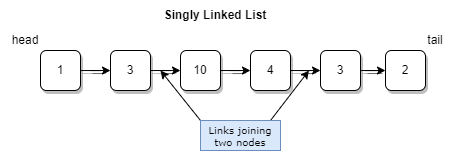
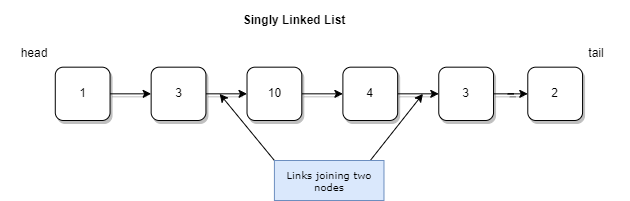
List is pointer based data structure which relies heavily on pointers to the next item. Lists consist of nodes where each node contains the data associated with the type of list and the pointer to the next node element. Again, next node contains the same information, its data and the pointer to next node and so on until the last element. The first element of the list is called the head and similarly the last element is called tail.
This implementation detail has certain advantages and disadvantages over Array based Lists. With this implementation, we cannot access element at a specific index in constant time. We have to traverse the list from beginning or end depending on the type of list to reach to specific index position and then retrieve that element. However, this also gives it an advantage that we can easily add new element or remove an element in constant time regardless of the size of the list.
The lists can be mainly categorized into two main types.
- Singly Linked List
- Doubly Linked List
You can perform following operations on a list.
- retrieve element from the list
- insert a new element into the list
- delete an element from the list
- check if an element occurs in the given list
- find out how many elements are in the list
A list can be implemented using two ways. One is using array to store its elements. Another approach uses Node elements. That actually uses linked data structure.
ArrayList implementation
To implement a list using arrays, we can store elements in an array. However, arrays have fixed size. If we exceed that size, we may get ArrayIndexOutOfBoundsException. So, to avoid such situation, we will need to expand our array when we reach end of the list. This operation literally requires creating new array and copying existing elements into the new array of larger size. This is an expensive operation as it requires O(n) time complexity. This is also called dynamic arrays sometimes because they change the size based on number of elements.
With this idea in mind, inserting new element will require just adding new element at the size - 1 index position as long as the array has enough empty spaces.
deleting an element can be slightly expensive ope
In Java, collections are implemented based on interface structure.
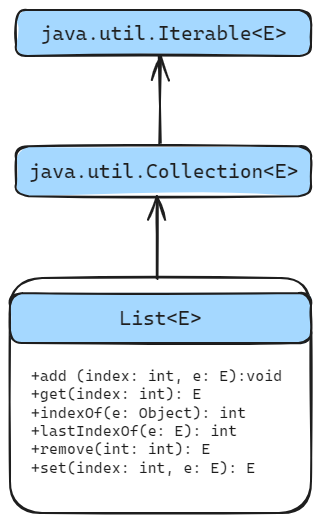
We also have to override some of the methods defined in the Collection interface for standard Java library.
What is Singly Linked List
In singly linked lists, we have single directional connections from head towards the tail. We cannot traverse backwards. Visually it looks like below.
To create singly linked list, we first need a single node which can be defined like below. For the sake of simplicity, I have marked member variables as public.
 1class Node {
 2    public int value;
 3    public Node next;
 4
 5    public Node() {
 6
 7    }
 8
 9    public Node(int value) {
10        this.value = value;
11    }
12}
As you can see, we have two member variables, one of type int to store integer values in this simple linked list and another Node itself to store pointer to the next node.
Now, this List should support several operations.
  1public class SinglyLinkedList {
  2
  3    private Node head;
  4//    private Node tail;
  5    private int size;
  6`
  70
  8
  9
 10
 11`
 12    public SinglyLinkedList() {
 13        this.head = null;
 14//        this.tail = null;
 15        this.size = 0;
 16    }
 17
 18    public SinglyLinkedList(int value) {
 19        Node node = new Node(value);
 20        this.head = node;
 21        this.size = this.size++;
 22    }
 23
 24    public int get(int index) {
 25        if (index < 0 || index >= size) return -1;
 26        Node currentNode = this.head;
 27        for (int i = 0; i < index; i++) {
 28            currentNode = currentNode.next;
 29        }
 30        return currentNode.value;
 31    }
 32
 33    public void insert(int value) {
 34        Node newNode = new Node(value);
 35        if (this.head == null) {
 36            this.head = newNode;
 37//            this.tail = newNode;
 38            this.size++;
 39            return;
 40        }
 41        Node currentNode = this.head;
 42//        this.tail.next = newNode;
 43//        this.tail = newNode;
 44        // without tail use below.
 45        while (currentNode.next != null) {
 46            currentNode = currentNode.next;
 47        }
 48        currentNode.next = newNode;
 49        this.size++;
 50    }
 51
 52    public void insert(int index, int value) {
 53        if (index > size) return;
 54        if (index < 0) index = 0;
 55        this.size++;
 56        Node currentNode = this.head;
 57        for (int i = 0; i < index - 1; i++) {
 58            currentNode = currentNode.next;
 59            System.out.println("after for loop" + Integer.toString(i) + " : " + currentNode);
 60        }
 61
 62        Node newNode = new Node(value);
 63        if (currentNode.next == null) {
 64            newNode.next = null;
 65        } else {
 66            newNode.next = currentNode.next;
 67        }
 68        currentNode.next = newNode;
 69        System.out.println("end of loop");
 70    }
 71
 72    public void prepend(int value) {
 73        this.insert(0, value);
 74    }
 75
 76    public void append(int value) {
 77        this.insert(this.size, value);
 78    }
 79
 80    public void delete(int index) {
 81        if (index < 0 || index >= this.size) return;
 82        this.size--;
 83        if (index == 0) {
 84            this.head = this.head.next;
 85            return;
 86        }
 87        Node currentNode = this.head;
 88        for (int i = 1; i < index; i++) {
 89            currentNode = currentNode.next;
 90        }
 91        currentNode.next = currentNode.next.next;
 92    }
 93
 94    public int size() {
 95        return this.size;
 96    }
 97
 98    public int find(int data) {
 99        Node currentNode = this.head;
100        for (int i = 0; i < this.size; i++) {
101            if (currentNode.value == data)
102                return i;
103            currentNode = currentNode.next;
104        }
105        return -1;
106    }
107
108    // TODO: Implement other methods
109
110    public void print() {
111        Node currentNode = head;
112        if (this.size == 0) {
113            System.out.println("Empty List");
114        }
115        while (currentNode != null) {
116            System.out.printf("%d => ", currentNode.value);
117            currentNode = currentNode.next;
118        }
119        System.out.println();
120    }
121}


Comments